A buyer-focused walkthrough of how a 24-hour programmable drip coffee maker works in practice — setting the clock, programming brew time, and loading the night before — plus what importers and private-label retailers should verify in a timer interface before placing an OEM order.
Buyer's Guide
If you sell coffee makers under your own label, the programmable timer is one of the first features your retail buyers will test in the showroom and one of the first support questions your team will face after launch. Here is how the timer actually works, where users get confused, and what to check before you commit to an OEM order.
Key takeaways
- A 24-hour programmable timer stores a clock time and an auto-brew time, then switches the heating element on at that time.
- The panel on most models uses four controls: program, hour, minute and auto/on-off, plus a digital clock display.
- The three most common user complaints are a clock reset after a power cut, AM/PM mix-ups, and forgetting to load water or grounds.
- For OEM buyers, the timer interface, clock backup behavior, keep-warm duration and voltage variant are the four points worth confirming before tooling.
On this page
How to set a coffee maker timer: the feature, step by step
The mechanics are the same across programmable drip coffee makers. The control board holds two time values — the current clock time and the auto-brew time — and a relay that switches the heater on when the clock reaches the brew time.
- Set the clock. Press the program or clock button until the display enters clock-set mode, then use the hour and minute buttons to reach the correct time of day. The clock runs on a 24-hour or 12-hour cycle depending on the model and the market it is built for.
- Set the auto-brew time. Press program again to move to the timer value. The display usually shows a small indicator (often "AUTO" or a clock icon) while you adjust the hour and minute to the time you want brewing to start.
- Activate auto mode. Press the auto or on-off button so the auto indicator stays lit. If the indicator is off, the machine will not brew at the preset time — this is the single most common setup mistake.
- Load water and coffee the night before. Fill the reservoir to the marking that matches the number of cups you want, fit the filter basket with grounds or the permanent filter, and close the lid. The machine has no way to know whether the basket is loaded; it only switches the heater on.
- Leave the carafe in place. On models with a keep-warm plate, the carafe sits on the plate during and after brewing. Many models will not start brewing when the carafe is missing, so confirm this behavior in the sample specification.
That is the full loop. The user does it once, and the machine repeats it every day until the timer is switched off or the clock is disturbed. The programmable function is therefore a stored time reference, not a sensor — which explains almost every problem users report.
What a programmable control panel actually looks like
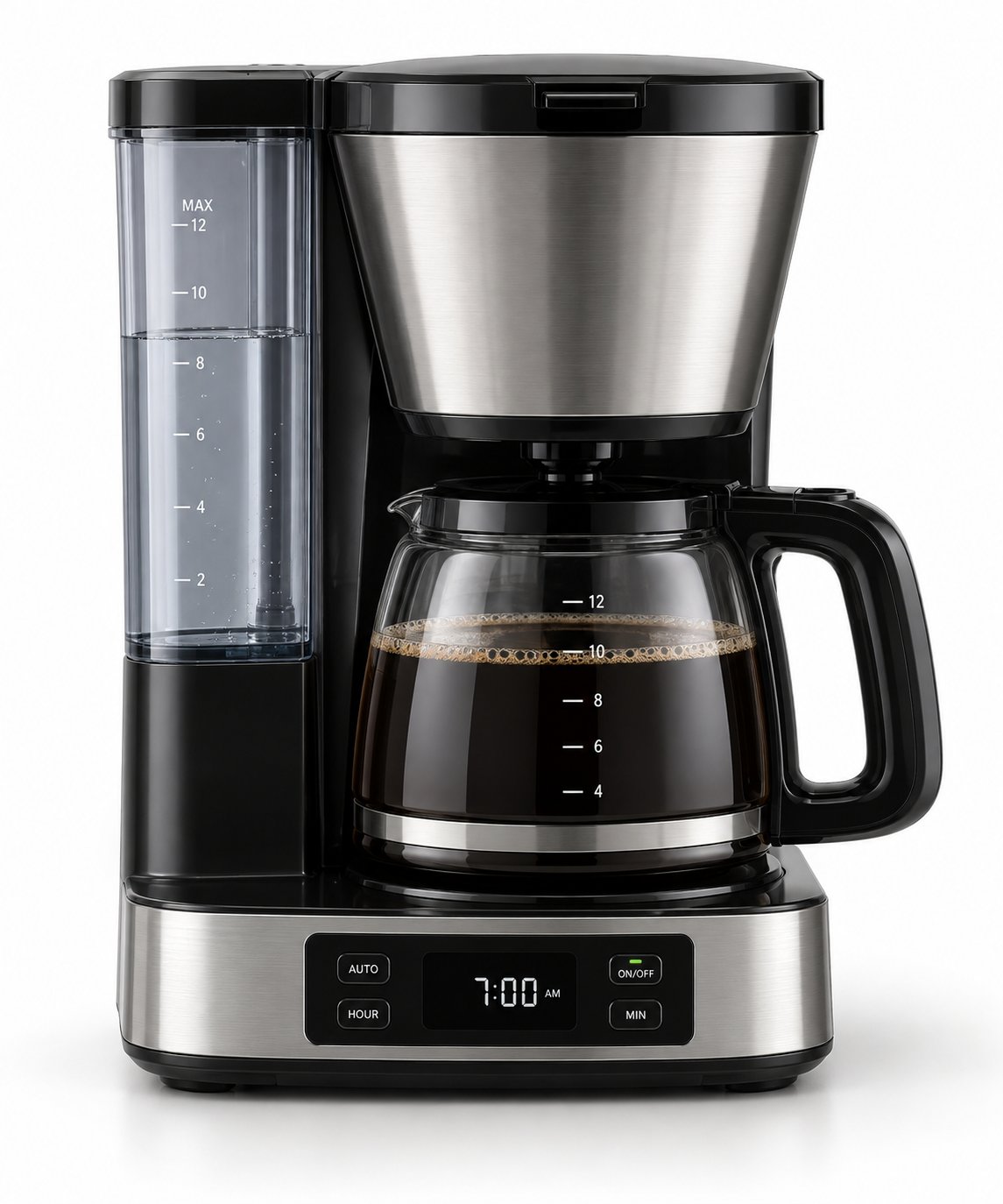
On the model ZY-CM300, the panel is a digital clock with a small button cluster. Four controls cover the whole function:
- PROGRAM — cycles between clock-set and timer-set mode.
- HOUR and MINUTE — adjust whichever value is currently selected.
- AUTO / ON-OFF — enables the auto-brew function or starts brewing immediately.
The display shows the current time, with the auto indicator lit when the timer is armed. In the product photo for this 12-cup programmable drip coffee maker, the clock reads 7:00 AM with the timer set, which is the typical morning-use configuration a retail buyer will see on the shelf. Two design details matter more than they appear at first glance: the size of the digital digits (readability at arm's length) and whether the AM/PM indicator is visible or only implied by a 24-hour display.
What can go wrong in real use
Clock reset after a power loss
The clock is the reference the whole function depends on. If mains power is interrupted, a machine without backup will lose the time and, in most cases, the armed auto setting as well. The user wakes up to an empty carafe and has to reset both values. Whether a design includes a backup battery or capacitor — and for how long it holds the time — is a hardware decision, not a user setting, so it belongs in the buyer's specification conversation rather than the instruction manual.
AM/PM confusion
On 12-hour displays, setting 7:00 for the evening instead of the morning is a routine error, and the machine behaves exactly as instructed. Panels that show a clear AM/PM marker or use a 24-hour clock reduce the support load noticeably.
Forgetting to load water or grounds
The timer switches the heater on; it does not detect an empty reservoir or a dry basket. A user who arms the timer but forgets the grounds gets hot water and a stained carafe. This is a user habit issue, but it is also a manual-writing issue — a short "load before you leave" line in the quick-start guide reduces returns.
Keep-warm and shut-off behavior
After brewing, the keep-warm plate holds the carafe at temperature. How long it stays on before automatic shut-off, and at what point the coffee is no longer considered fresh, varies by design and by market expectation. This is the second specification most often changed between the EU and US versions of the same platform.
What private-label buyers should verify before ordering
For an OEM program, the timer is a small feature with a disproportionate effect on return rates. Four points are worth locking down during requirement review and sample development.
| Verification point | What to confirm | Why it matters |
|---|---|---|
| Timer interface clarity | Button layout, digit size, AM/PM indication, icon language, and whether the manual matches the panel wording | Reduces setup errors and customer service contacts in the first weeks after launch |
| Clock backup behavior | Whether the clock survives a power interruption, and how the unit behaves when it does not | Determines the wording of the user guide and the realistic expectation for morning brewing |
| Keep-warm duration | The length and shut-off pattern of the keep-warm cycle appropriate to your market | Affects energy labeling discussions and retail compliance in different regions |
| Voltage variant | 220–240 V / 50 Hz for EU or 120 V / 60 Hz for US, with the matching plug and cord | A single platform cannot ship to both markets without the correct electrical configuration |
Beyond the panel itself, confirm the physical elements that support the timer routine: the removable water reservoir with cup markings, the removable filter basket with permanent filter, and the 1.2 L (12-cup) glass carafe that sits on the keep-warm plate. These are the parts a user handles every evening, and they define how naturally the timer fits into a daily routine.
Program planning notes
Guangdong Zhiyue Electric builds the ZY-CM300 platform for European and North American buyers as an OEM/ODM program. Sample development starts from a written requirement review, and QC runs through production and final inspection. The standard MOQ is 500 units, with lead time of 30–45 days after sample approval. CE, RoHS and LFGB documentation is available upon request, matched to the specific market and configuration ordered. For an OEM program, the timer interface wording, the clock behavior and the keep-warm specification are normally settled at sample stage — changes after tooling are expensive for both sides.
Product specifications
- Model: ZY-CM300
- Capacity: 1.2 L (12 cups), glass carafe
- Power: 900 W
- Timer: 24-hour programmable
- Keep-warm plate: yes
- Filter: removable basket with permanent filter
- Reservoir: removable, with cup markings
- Voltage: 220–240 V / 50 Hz (EU); 120 V / 60 Hz (US)
- MOQ: 500 units; lead time 30–45 days after sample approval
Full specifications and the product photo are on the 12-cup programmable drip coffee maker product page.
FAQ
Does the timer brew immediately when I press AUTO?
No. Pressing AUTO arms the stored brew time; the machine waits until the clock reaches that time. Immediate brewing is a separate function, usually the same button pressed without the auto indicator.
Can the machine brew without water in the reservoir?
The timer only controls the heater. It does not detect water level, so the reservoir must be filled before the timer runs.
Will the clock keep time if the power goes out?
That depends on the control board design. Buyers ordering under a private label should confirm the expected behavior with the supplier and reflect it in the user manual.
What voltage does the ZY-CM300 use?
The platform is available in 220–240 V / 50 Hz for the EU and 120 V / 60 Hz for the US. The correct variant must be specified at order stage.
What certifications are available?
CE, RoHS and LFGB documentation is available upon request, depending on the market and configuration.
Questions about the timer interface, clock behavior or voltage configuration for your market? Contact the supplier with your target market, expected annual volume and any panel wording requirements so the sample specification can be prepared before tooling.